Test Coverage for Jira
Linked test count and coverage status as real, searchable Jira fields. Counts any linked work item whose type name ends in "Test" — Xray's, or your own.
Your test management app knows which work items have tests. Jira does not.
You can go and find out — open a work item and read its links, and a JQL add-on will let you search across them. What none of that gives you is a field: coverage is never a navigator column, never something you sort on, and never in a CSV export.
Test Coverage adds two ordinary, indexed Jira fields to every work item that has links:
- Test Coverage —
CoveredorNot covered - Linked Test Count — how many Test work items are linked to it
"Test Coverage" = "Not covered" AND status != Done AND fixVersion = "3.2"
"Linked Test Count" = 0 AND type = Story AND sprint in openSprints()
ORDER BY "Linked Test Count" DESC
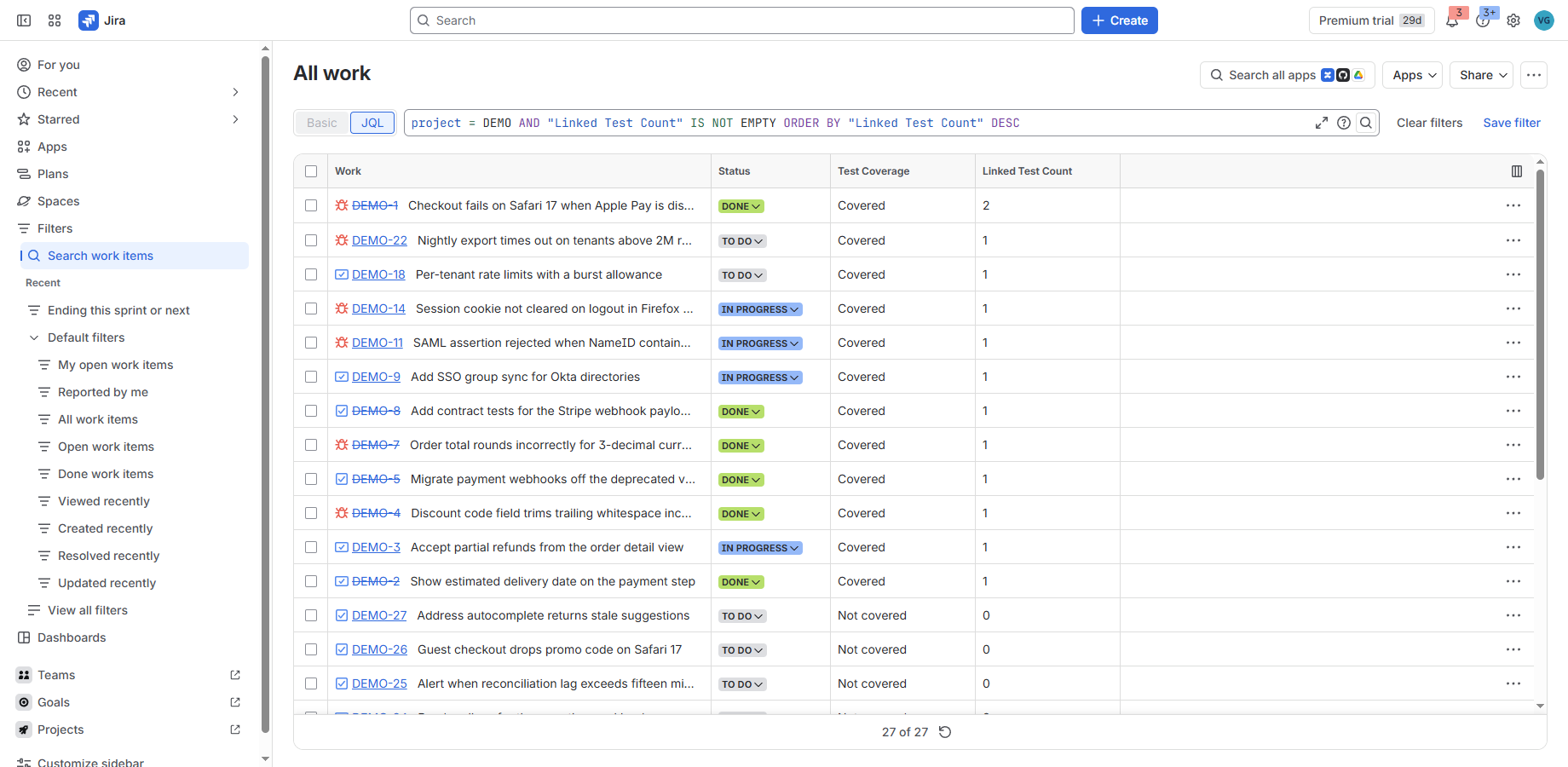
Where the fields work
| Surface | Supported |
|---|---|
| JQL search, including numeric ranges | Yes |
Sorting (ORDER BY) by real value |
Yes |
| Saved filters | Yes |
| Navigator columns | Yes |
| CSV export | Yes |
| On the work item itself | Yes, in the context column |
Board columns and dashboard gadgets are not claimed here either, for the same reason: they have not been verified.
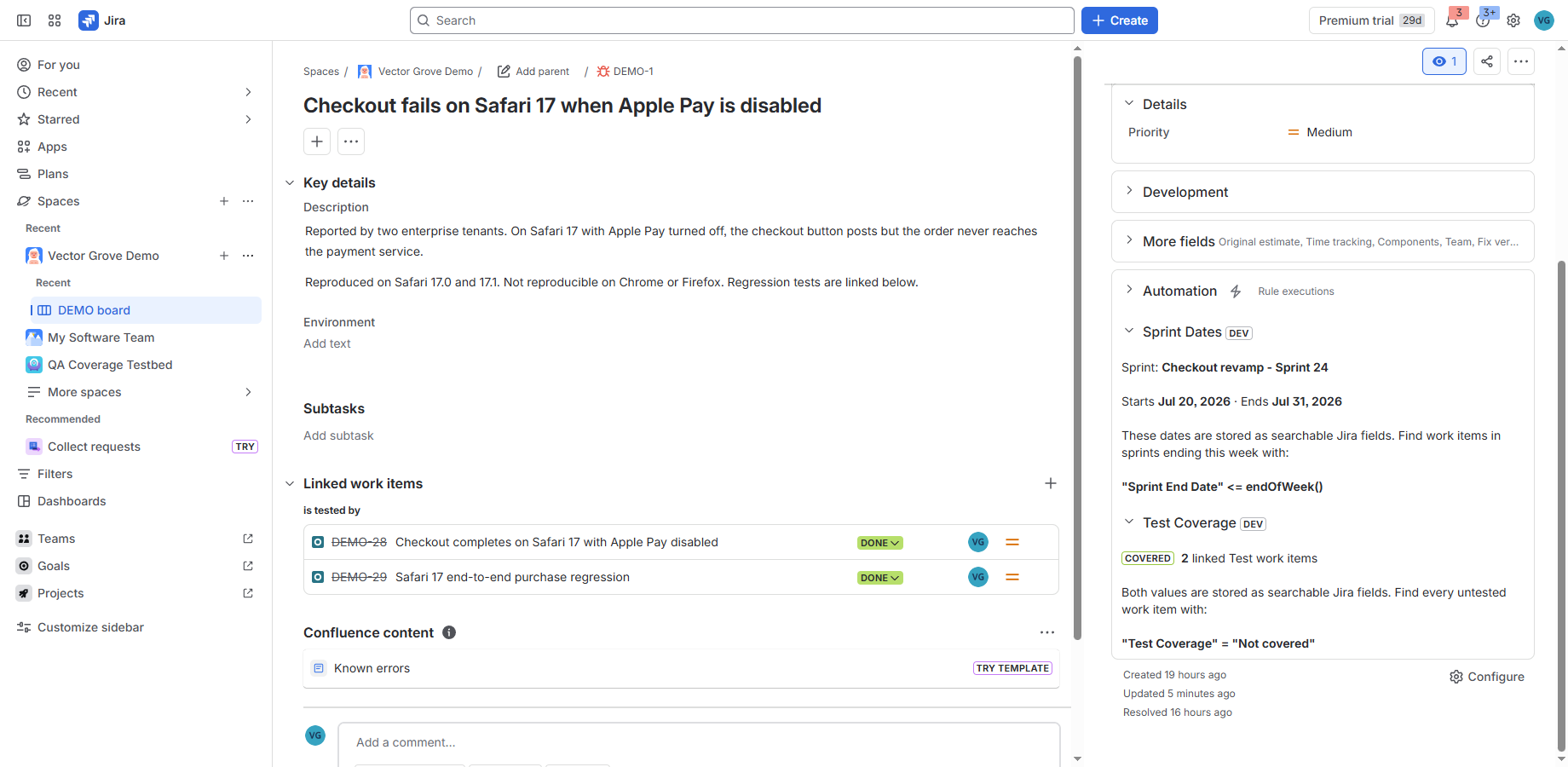
DEV badge is Jira marking an app
installed from a development environment; it does not appear on a Marketplace install.Which tests it counts, and which it cannot see
Coverage is computed from the Jira issue graph. Any linked work item whose type name
ends in “Test” counts — Xray’s Xray Test, or a team’s own Manual Test —
in either link direction, whatever the link type is called.
It deliberately does not count Test Set, Test Plan, Test Execution,
Sub Test Execution or Precondition. Over-reporting coverage is worse than
under-reporting it, because it tells someone it is safe to ship.
That rule is the whole product, and it has an edge worth knowing before you buy.
If your test management app keeps its test cases in its own store rather than creating
them as Jira work items, then Jira cannot see those tests and neither can this app: the
requirement will read Not covered even though it is tested. Xray creates Jira work
items, so it works — verified on a live Jira site. Other test management apps
differ, and some keep their test cases entirely outside Jira. Check first: open a covered
requirement in Jira and look at its links. If the linked tests appear there as work
items with a type name ending in “Test”, this app will count them. If they do not
appear in Jira at all, it will not.
Because it reads Jira rather than a vendor’s backend, it keeps working if you migrate between test management apps, or stop using one entirely — as long as your tests are Jira work items, they stay in Jira, and so do your coverage fields.
Xray is a trademark of Xblend/Xpand IT. It is named here because this is the one test management app we have installed and measured, and naming it describes how this app does or does not interoperate with it — no endorsement, affiliation or partnership is implied.
What it does not do
Stated plainly, because a surprise here would earn a one-star review.
- No pass/fail. Whether a test passed lives in your test management app’s own backend — Xray’s Test Runs are not Jira links — and reaching it would need egress and your API credentials. This app is deliberately no-egress. Coverage means a test exists and is linked, not that it passed.
- No test authoring, execution or reporting. It is a companion to your test management app, not a replacement for one.
- Only linked work items are scored. A work item with no links at all is left blank
rather than marked
Not covered, because an item never meant to carry tests is not a coverage gap.
How the fields stay correct
Link or unlink a test and the fields update within seconds. An hourly reconciliation repairs anything that drifts — including cases Jira raises no event for, such as a linked Test work item being deleted outright.
What it stores
Work item links and work item types, read at the moment coverage is computed. It never reads summaries, descriptions, comments or attachments, and it never contacts a third-party service. Full detail on the security and data page.
Pricing
This app is not on the Atlassian Marketplace yet, so there is nothing to buy today and no rate is binding anywhere. What follows is what the pricing will be when it lists.
Free on Jira sites of 10 users or fewer, per Atlassian’s Marketplace rules. Above that, per user per month, with the rate falling as the site grows. The Marketplace listing will carry the binding rates, and this page will link to it once it is live.
Support
Questions and bug reports: issue tracker. See the support page for what to include.